How to Watch BBC Iplayer Abroad on iPad From Outside the UK
Update for those who want to unblock BBC iPlayer on their mobile device then there are now even more options available. Although the method below works well, there is a slightly easier option to watch BBC iPlayer outside the UK and indeed all of the UK streaming services on smartphones and tablets like the iPad. Instead of configuring virtual private networks directly on your devices, the new range of VPN services have applications you can install very easily –
Try the NordVPN Mobile VPN App here
There are applications in the members area for all major devices which are simple to install, here’s the android version.
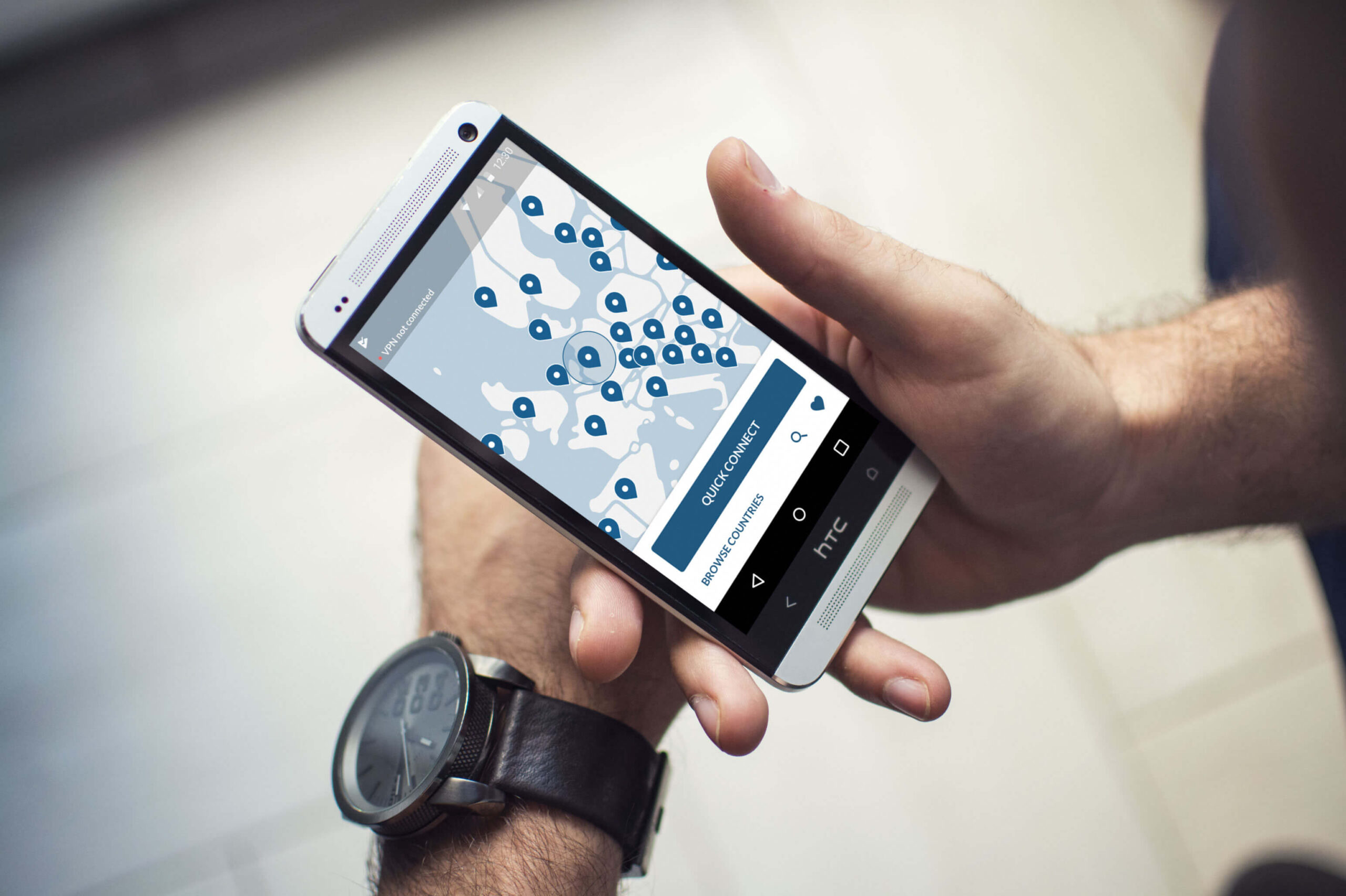
Using these apps you can install NordVPN on all your devices (up to a limit of six on one subscription) and gain access to their VPN servers all over the world. Remember you don’t need a TV license and you can also use the VPN to access radio shows and other geo restricted sites in many different countries.
This page is for all of those who get really fed up that the minute we step outside the UK all the online UK TV sites stop working. Especially of course if you want to access BBC iPlayer, which many of us use everyday! If you want to start watching the BBC Iplayer on a PC/Laptop – Try this post first – How to Use a Proxy to access Iplayer . The article below follows step by step instructions on using BBC iPlayer abroad on your iPad. If you don’t want security and just want the easiest method to watch British TV anywhere in the world without using a VPN there’s another option suggested at the end of this article.
If you just want to see a video demonstration of how you can set up to access BBC and any other streaming service then scroll down to the video below or the step by step guide.
This article describes using a program called Identity Cloaker which was one of the very first VPN services available. There are now of course, hundreds of them many with far slicker interfaces than this. However it’s important to remember that by far the most important factor in accessing geo-blocked sites like BBC iPlayer is the VPN server themselves.
Lots of VPNs Won’t Let you Watch BBC iPlayer Anymore
Many of the fancier, low cost VPN service providers lower prices by loading thousands of users on the same servers.
This results in poor performance and very slow speeds especially if you try and access a streaming service through them.
The other important issue with an overloaded VPN server is that they get blocked all the time. When BBC iPlayer sees the same IP address being used to make thousands of connections to their site, they know instantly it can only be from a VPN service. The result is that the address gets blacklisted and won’t work for a period of time. If your primary use of a VPN is to access BBC iPlayer, UK TV or similar sites then this obviously is a problem!
I’ve been using the VPN function of Identity Cloaker for several years to watch BBC iPlayer abroad on my computer. However I often get emails about whether you can use it on different devices to watch BBC, ITV and other online TV players. Well you can use it on most devices, including Smartphones, tablets and laptops. You just need to set up the Virtual Private Network on each device manually.
Anyway here’s simply how to set up Identity Cloaker on the iPad, the steps for an iPhone, Mac or Android Device are pretty similar too – details if you’re using Identity Cloaker are in the members area.
Being able to watch BBC Iplayer (and ITV player) on these devices is actually pretty simple to do. The reason is that the vast majority of their security servers are VPN enabled. That means all you have to do is set a simple VPN connection on your iPad to a specific server and then you can enable it whenever needed to view abroad. The functionality is built into the iPad so nothing too difficult is required – let’s show an example for accessing the BBC iPlayer channels abroad.
So How Can You Watch BBC iPlayer Abroad? Even From the US on Your iPad?
Right, so most of us have discovered that if you happen to be outside the UK, then the BBC iPlayer won’t work properly. When you connect to the iPlayer site it checks your IP address to see where you are located. If it discovers that you are connecting from outside the United Kingdom then you won’t be able to watch anything ! To be fair, BBC iPlayer is not the only media site to do this. Hulu blocks all non-US access – the same goes for ABC, NBC and Pandora too. The great little media player from the French broadcaster M6Replay is also limited to access within France (if you know someone learning French get them to check it out – it’s great practice watching the Simpsons in French!)
The solution on the PC is very simple, you just use something like Identity Cloaker to conceal your true IP address and present one from the correct country. The solution is actually similar on the IPad (you can use the same technique on the Mac/Iphone/Ipod as well) – you just need to connect to a server based in the UK (or which ever country you need).
For this all you need to do is to set up a VPN (Virtual Private Network) to the country in question, for the BBC it’s obviously the UK. This video shows the steps needed, it’s called Setting up a VPN on an iPad
How to Watch BBC iPlayer on an iPad Abroad – Step by Step
If you prefer pictures, then here’s how you set up the VPN on the iPad it takes about a minute if you have the information to hand. Just set it up, enable the VPN and you’ll be watching the BBC Player outside UK borders in no time at all.
On your iPad –
- Select Settings
- Select General
- Select Networks
- Select VPN
This should bring you to this screen –
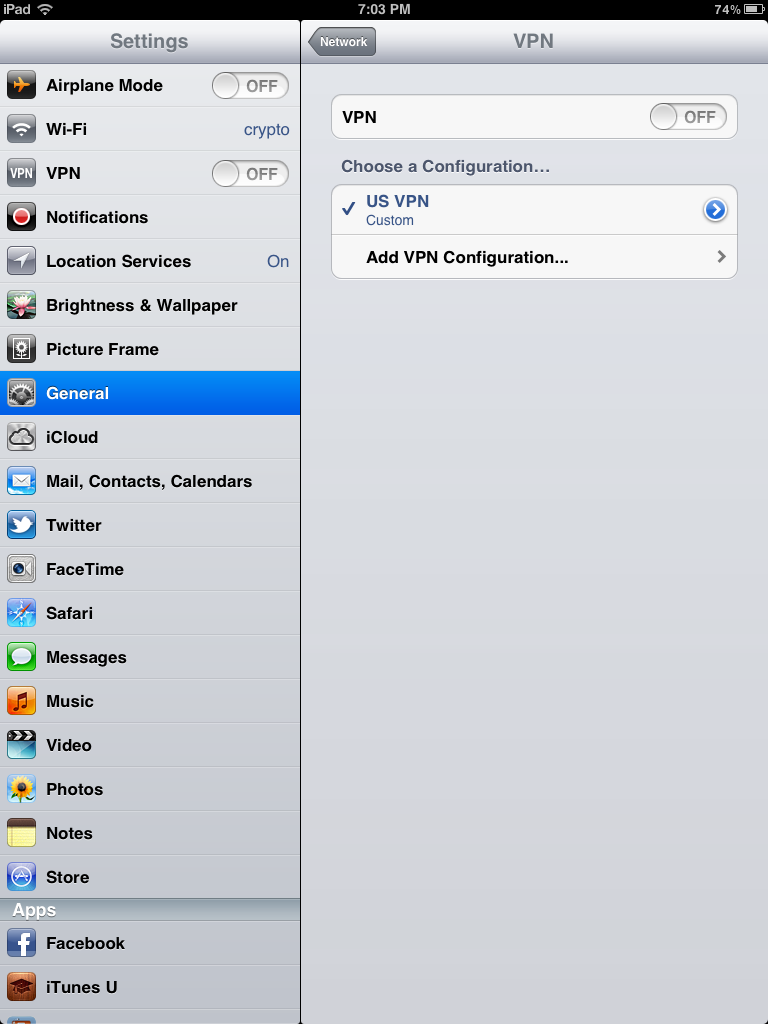
You can see in this screen I’ve already set up a US VPN which I use for Hulu and Pandora. Here you just need to select Add VPN Configuration and you should reach this screen.
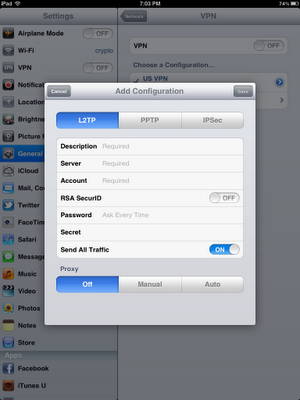
It looks complicated but honestly it’s not.
You just need to leave it set to L2TP at the top and then put the following details in. You’ll need to get the details from Identity Cloaker for section 2 and 6 which you can find in their members area. If you’re using a different VPN provider it’s likely you’ll have to do the same (although a couple publish the information I think)
- Description – Give it a name like British VPN, US VPN then you can select quickly which country you need
- Server – Get the enabled VPN server names from the members area.
- Account Name – Your IDC Username
- RSA SecurID – Ignore this
- Password – Your IDC password.
- Secret – Get the VPN Secret Name from the members area.
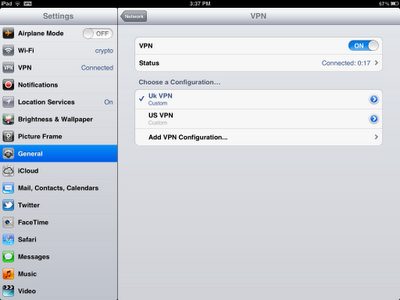

When this VPN is connected, all your traffic is encrypted and routed through whichever server you are connected to. It’s best to disconnect after watching unless you want all your browsing routed through the UK.
Be careful when you’re choosing a service to use on your iPad, especially to watch iPlayer. If you search online you’ll see many posts about a BBC iPlayer VPN not working. This is because most of these services have been blocked by the BBC and other channels so you won’t be able to watch any UK TV abroad on iPad if you use these. Pick a proper security service like Identity Cloaker not one of the generic TV watching ones , they’re easy to detect and most don’t work anymore.
If you haven’t got Identity Cloaker yet – I can definitely recommend it, it’s probably best to try the trial first though to see how you get on with it. They have a very professional set up and the servers can cope with streaming video without any issues . They are also undetectable so you you won’t have the common issues that many services have with BBC iPlayer detecting VPN connections and blocking them. They have many UK and US servers plus ones in France, Germany, Poland, Ireland, Sweden, Australia to name but a few – all included in the subscription.
It’s also one of the few services which allows you to watch Sky Go abroad too, but you’ll need a valid subscription first.
Here’s the link for Identity Cloaker – I can recommend the 10 day trial subscription here to try it out first.
This method may work with other VPN providers who have set their servers up properly though – just ask them. Remember you just need to set up one connection for each country, so to access iPlayer outside UK then you need to create a UK connection.
A Useful Alternative that Works to Watch BBC iPlayer
I have just discovered another interesting alternative for those of us looking on how to access sites like BBC iPlayer abroad on their iPads or tablets. It’s called Smart DNS, it’s arguably easier that using a VPN especially on devices like iPads. It’s called Smart DNS and only takes two minutes to set up, if you follow the instructions – what’s more they have a free trial which you can test too – free trial of Smart DNS.