
Last Updated on November 5, 2026
There’s a useful way to examine what something like a VPN is doing without relying on its all it’s promotional and marketing material: simply look at the DNS answers it gives you. DNS is usually pretty straight forward. Ask for a website’s address, get an IP address, then use it to establish the connection.
Here’s the video of how you use it, details and an explanation are below in the post.
But now we’ve noticed that many security tools including commercial VPN services sometimes interfere with that process deliberately, particularly when streaming platforms are involved. While investigating NordVPN’s SmartPlay feature, we found a Netflix DNS response that deserved a closer look.
The address was 192.0.0.69.
And it appeared regardless of whether we connected through the UK, United States or France.
A DNS result that stands out
NordVPN describes SmartPlay as a combination of VPN and SmartDNS technology designed to improve compatibility with streaming services. The interesting part is what happens when the DNS resolver is asked for a streaming domain.
With NordVPN connected, we ran a conventional DNS lookup for:
www.netflix.com
The resolver was NordVPN’s DNS server at 103.86.96.100.
Its response was:
192.0.0.69
That’s kind of strange and not the sort of public address you’d normally expect from a large content delivery network. The address sits within a special-purpose IPv4 range, rather than representing an ordinary publicly routed Netflix destination. By contrast, a conventional public DNS lookup would normally return publicly reachable addresses for Netflix’s web infrastructure.
This suggests that NordVPN is providing an alternative destination that its own network can handle. 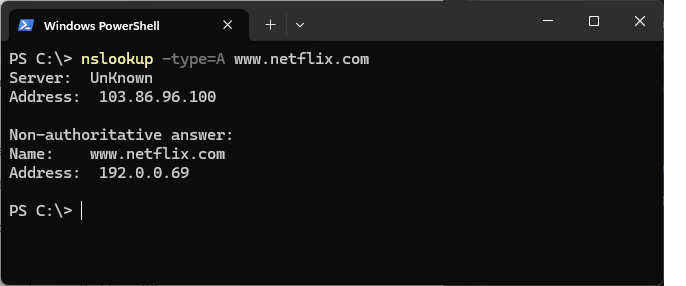
A useful distinction here: the DNS answer is not the public IP address assigned to the VPN connection. They’re separate pieces of information serving different purposes – NordVPN uses DNS for Netflix in a non-standard way – it’s used to detect and re-route through specialized hardware.
Does anything actually answer at that address?
Receiving an unusual DNS response doesn’t establish much on its own. An address is useful only if the subsequent connection works.
We therefore tested HTTPS connectivity using curl from Windows PowerShell.
With NordVPN connected to US server #13126, we requested:
https://www.netflix.com/
The relevant output was:
Connected IP: 192.0.0.69
HTTP status: 200
The request succeeded.
So we’re not simply looking at an odd DNS entry. The VPN connection was capable of reaching Netflix over HTTPS using the special-purpose destination. That’s consistent with a forwarding or proxy arrangement in which the VPN provider handling traffic for selected domains internally.
It doesn’t reveal the complete route, however. The result says nothing definitive about the final public IP address used for the request, the location of any forwarding proxy or the individual connections involved in delivering video content. Those would require a more involved investigation.
The same result in three countries
We also repeated the DNS lookup using different NordVPN locations.
The British, American and French VPN connections all returned 192.0.0.69 for the Netflix website. So the same unrelated special network address is used everytime anyone requests Netflix with a VPN enabled. The public VPN address changes when you switch countries, but the special Netflix DNS response remained the same during all our tests. One plausible explanation is that NordVPN uses a consistent internal destination address, with the actual handling determined elsewhere in its network.
That would make the DNS response independent of the country selected in the VPN application. It’s a reasonable interpretation of the results, although DNS alone cannot identify the physical servers or forwarding route involved. The general technique isn’t new. University of Twente researchers documented specialised DNS responses and TLS forwarding behaviour in commercial VPN services in 2023. Their Netflix measurements included the same 192.0.0.69 address.
What we’ve observed suggests that this form of DNS handling remains in use, even if the underlying infrastructure has changed.
The practical test
Of course, network behaviour is only half the story.
We also wanted to know whether the connection was useful for streaming. Our US NordVPN server had the public IP address 187.14.50.32, which Netflix’s Fast.com service identified as originating from New York. We then opened Netflix and successfully played a film available in the American catalogue but unavailable on our normal UK connection.
I tested playback for a couple of minutes without issues. A subsequent connection through France also allowed Netflix to load normally. That gives us two separate findings: NordVPN uses unusual DNS handling for Netflix, and its US VPN connection successfully accessed regional content during our test. We haven’t demonstrated that SmartPlay was the determining factor in the playback result.
Watch the Network tests
The accompanying video shows the PowerShell results, the DNS behaviour and the practical Netflix connection tests. It’s a useful demonstration of the difference between what the VPN application displays and what happens at the networking level.
What can we conclude?
The evidence is consistent with NordVPN using specialised infrastructure for selected Netflix connections. But it’s important not to confuse the DNS address with the ultimate streaming endpoint, or to assume that every Netflix domain is handled identically. The tests also don’t establish that all video streams traverse the forwarding arrangement we’ve observed for the main Netflix website.
For a full investigation, we’d need to inspect additional Netflix domains, connection destinations and traffic behaviour during actual playback. That would be a worthwhile networking exercise, although considerably more involved than checking whether Netflix works through a VPN. For now, the most useful finding is quite simple.
NordVPN’s SmartPlay isn’t merely a name for changing your apparent country. Our results show that it includes specialised DNS behaviour, with working HTTPS connectivity through an address that wouldn’t normally be used as a public Netflix endpoint.
It’s a reminder that the single Connect button in a commercial VPN application can be used to conceal a surprisingly complicated set of networking decisions.
